
AI Functions
Singdata Lakehouse AI Functions are a set of AI-enhanced functions built directly into the SQL engine. Without leaving the data platform or writing Python scripts, you can call large language models (LLMs) and embedding models directly in standard SQL queries to intelligently process text, images, audio, and more.
For a detailed introduction, see AI Functions Overview.
Model Access Methods
The first parameter of every AI Function is model, which supports two access methods:
Method 1: API Gateway Endpoint (recommended)
A platform administrator pre-configures model services in the API Gateway, and you reference them using the endpoint: prefix:
Method 2: API Connection object
You create a connection object yourself using CREATE API CONNECTION, which is suitable for custom service addresses or private deployment scenarios:
Function Reference
Text Understanding and Generation
AI_COMPLETE
A general-purpose LLM completion function that supports custom prompts. Use it for complex reasoning, code generation, and other custom scenarios that specialized functions cannot cover.
Return value: STRING — the response text generated by the model.
Usage notes:
- When a task can be handled by a specialized function (such as
AI_TRANSLATEorAI_SENTIMENT), prefer the specialized function for more stable results and lower cost. - Image mode requires a multimodal-capable model (e.g.,
doubao-seed-2-0-pro-260215); passing an image to a text-only model will not raise an error but the image content will be ignored. - The qwen3 series models have thinking mode enabled by default. For batch processing, it is recommended to disable it via options:
json '{"model.params":{"enable_thinking":false}}' - Returns NULL when
promptis NULL or an empty string.
Full documentation: AI_COMPLETE
AI_SUMMARIZE
Generates a concise summary of the input text. Supports controlling summary length via max_words.
Return value: STRING — a summary of the input text.
Usage notes:
max_wordsdefaults to 50. It is a target value, not a hard limit; actual output may vary by ±20%.- When
max_words=0, the original text is returned without calling the model. - A negative
max_wordsvalue raises an error. - Returns NULL for NULL input; returns an empty string for empty string input.
- The output language automatically follows the input language.
Full documentation: AI_SUMMARIZE
AI_TRANSLATE
Translates input text into a specified language. The source language is detected automatically, and 20+ languages are supported.
Return value: STRING — the translated text.
Usage notes:
to_langmust be a valid ISO-639 language code (e.g.,'zh','en','ja'). Full language names are not supported.- Manual specification of the source language is not supported; it is always detected automatically.
- If the input and target languages are the same, the original text is returned unchanged.
- Can be combined with
AI_SUMMARIZE(summarize first, then translate).
Full documentation: AI_TRANSLATE
AI_FIX_GRAMMAR
Automatically corrects grammar, spelling, and punctuation errors in input text. Supports Chinese, English, and mixed-language text.
Return value: STRING — the corrected text. If the input contains no grammar errors, the original text is returned unchanged.
Usage notes:
- Returns NULL for NULL input; returns an empty string for empty string input.
- Mixed Chinese-English text is intelligently unified to the dominant language.
- The focus is on grammar correction; in rare cases the meaning may be slightly altered. Manual spot-checking is recommended for semantically sensitive scenarios.
- It is recommended to use this function to clean text before calling
AI_SENTIMENTorAI_SUMMARIZE.
Full documentation: AI_FIX_GRAMMAR
Text Analysis and Classification
AI_CLASSIFY
Classifies text or images into user-defined categories without writing a prompt. Supports 29+ languages and cross-language classification.
Return value: STRING — the name of the best-matching category (a plain string, not JSON).
Usage notes:
labelsis an ARRAY(STRING). 2–10 categories are recommended, and category names should have descriptive semantics.- For image input, use the
GET_PRESIGNED_URL(USER VOLUME, path, expiry) AS imagesyntax. - For batch classification, setting
enable_thinking:falseis recommended to speed up responses. - Returns NULL for NULL input; returns an empty string
""for empty string input. - Labels can all be in English and will still classify correctly even when the input is in another language.
Full documentation: AI_CLASSIFY
AI_SENTIMENT
Performs sentiment analysis on input text. Supports multiple languages including Chinese, English, and Japanese.
Return value: STRING — one of the following values:
| Value | Meaning |
|---|---|
positive | Positive sentiment |
negative | Negative sentiment |
neutral | No clear sentiment |
mixed | Both positive and negative sentiment present |
Usage notes:
- Returns NULL for NULL or empty string input.
- Can recognize complex semantics such as sarcasm/irony, double negatives, and emoji sentiment.
mixedmeans the text contains both positive and negative evaluations;neutralmeans the text carries no sentiment.- Results are non-deterministic; the same input may produce slightly different results across multiple executions.
Full documentation: AI_SENTIMENT
AI_EXTRACT
Extracts structured JSON data from unstructured text or images according to specified fields, without writing a prompt.
Return value: STRING (JSON format) — contains all fields defined in schema and their extracted values. All field values are of string type.
Usage notes:
schemaformat isJSON'{"key":"field description", ...}'. Values support simple labels or question-style descriptions.- No more than 10 fields are recommended; up to approximately 20 are supported.
- If a field cannot be found in the text, its value is an empty string
"". - Returns NULL for NULL or empty string input.
- The return value is a JSON string and can be further parsed with
json_extract_string.
Full documentation: AI_EXTRACT
AI_MASK
Identifies and masks PII sensitive information in text, replacing it with a [MASKED] placeholder. Labels are user-defined.
Return value: STRING — the masked text. If the text does not contain information matching the specified labels, the original text is returned unchanged.
Usage notes:
labelsis an ARRAY(STRING). The count must be between 1 and 20; an empty array is not allowed.- More specific labels yield more accurate results (e.g., "national ID number" is more precise than "document").
- Matching the label language to the text language produces better results.
- All masked information is uniformly replaced with
[MASKED], regardless of type. - AI masking is LLM-based and may have missed or false detections. Manual spot-checking is recommended for compliance scenarios.
Full documentation: AI_MASK
Vector and Semantic Search
AI_EMBEDDING
Converts text into high-dimensional embedding vectors for downstream tasks such as semantic retrieval, recommendations, and clustering.
Return value: ARRAY<FLOAT> — the embedding vector of the input text.
Usage notes:
- An embedding model (e.g.,
text-embedding-v4) must be used; chat completion models cannot be used. - Results are deterministic; the same input always returns the same vector.
- In retrieval scenarios, use
"input":"document"when indexing documents and"input":"query"for user queries. - Returns NULL for NULL input; raises an error for empty string input — filter before calling.
- Input length limit is 8,192 tokens; a maximum of 10 items can be processed per call.
Full documentation: AI_EMBEDDING
AI_SIMILARITY
Calculates the cosine similarity between two pieces of text based on an embedding model, returning a score in [0, 1].
Return value: FLOAT — cosine similarity, which in practice typically falls in the [0, 1] range.
| Range | Meaning |
|---|---|
| 1.0 | Semantically identical |
| > 0.7 | Highly similar |
| 0.3 ~ 0.7 | Somewhat related |
| < 0.3 | Largely unrelated |
Usage notes:
- An embedding model must be used; LLMs cannot be used.
- Results are deterministic, and the function is symmetric (
a,bandb,areturn the same result). - Returns 0 when either parameter is NULL.
- Supports cross-language similarity calculation (e.g., comparing Chinese and English semantics).
- In batch CROSS JOIN scenarios, token consumption = rows² × average token count. Evaluate your quota in advance.
Full documentation: AI_SIMILARITY
Multimodal Processing
AI_TRANSCRIBE
Transcribes audio files in a Volume to plain text (ASR). Supports multiple languages including Chinese and English.
Return value: STRING — the plain-text transcription of the audio content, without timestamps or speaker information.
Usage notes:
audio_urlmust be a URL starting withhttp://orhttps://, typically obtained viaGET_PRESIGNED_URL().- Supports WAV, MP3, FLAC, and M4A formats. 16kHz mono WAV is recommended.
- A presigned URL validity of 36,000 seconds (10 hours) is recommended to avoid URL expiration during batch processing.
- Returns plain text that can be used directly as input to functions like
AI_CLASSIFYorAI_EXTRACT. - Silent or near-silent files may produce a small amount of hallucinated text; downstream length filtering is recommended.
Full documentation: AI_TRANSCRIBE
Common options Parameter
Functions such as AI_CLASSIFY, AI_EXTRACT, AI_SIMILARITY, and AI_TRANSCRIBE support an optional options JSON parameter:
| Parameter key | Type | Description |
|---|---|---|
response.timeout | STRING | Per-request timeout in seconds, e.g., "300" |
task.concurrency | STRING | Concurrency for batch processing, e.g., "12" |
model.params | JSON | Parameters passed through to the model, e.g., {"enable_thinking": false} |
Prerequisites
- A model endpoint has been configured in the API Gateway, or a connection object has been created via
CREATE API CONNECTION. - The current user has permission to call the relevant endpoint or connection.
- For image and audio processing scenarios, files must be uploaded to a Volume and an access URL obtained via
GET_PRESIGNED_URL().
Related Documentation
- AI Functions Overview
- AI_COMPLETE
- AI_CLASSIFY
- AI_EXTRACT
- AI_SENTIMENT
- AI_SUMMARIZE
- AI_TRANSLATE
- AI_FIX_GRAMMAR
- AI_MASK
- AI_EMBEDDING
- AI_SIMILARITY
- AI_TRANSCRIBE
Customizing AI Functions via External Functions
In addition to the built-in AI Functions, Singdata Lakehouse also supports developing custom AI functions through the External Function framework. This is suitable for scenarios that require connecting to private models, offline inference packages, or custom business logic.
External functions (also known as Remote Functions) are a special type of user-defined function (UDF) that allows you to define function logic in Python or Java, with the core computation offloaded to an external remote service (Alibaba Cloud Function Compute FC and Tencent Cloud SCF are supported). During execution, the following can be called:
- Online services: Online services provided externally via API, such as large language model APIs and online AI API services provided by cloud platforms.
- Offline features: Offline service packages that bundle specific function code, dependency libraries, models, and data files, such as image recognition models downloaded from Hugging Face.
Singdata Lakehouse stores the connection and access information for external function compute services in metadata by creating an API Connection. External functions call the external compute service via HTTP protocol, process data, and return results.
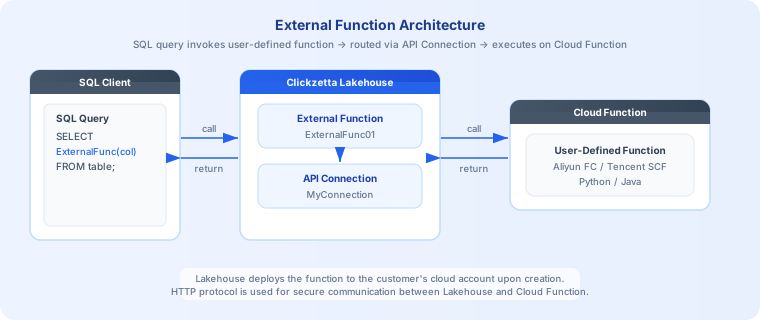
After receiving prior user authorization, the Lakehouse platform automatically deploys the function to the function compute service under the customer's account when the external function is created. When you use an external function in a SQL query, the external function handles the secure connection to the external compute service, data processing, and returns the query results.
Main process for creating external functions: Usage Process: External Function
Development guides: