
Python Task Usage Practice
In the task development module, the Python task provided is a specific task type under a lightweight resource container, designed to run Python code. It offers environment isolation between tasks and has basic environment customization capabilities. This article introduces some usage practices for Python tasks.
Runtime Environment and Customization
Python tasks are executed in a system preset Pod environment, with the pre-installed Python version being Python 3 (current version is 3.10, which may be updated in the future).
The default system image includes some commonly used dependency packages to support connection and data access with Singdata Lakehouse, as well as operations on object storage services such as Alibaba Cloud OSS and Tencent Cloud COS. These dependencies include but are not limited to:
- clickzetta-connector
- clickzetta-sqlalchemy
- cos-python-sdk-v5
- numpy
- oss2
- pandas
- six
- urllib2
- ...
To meet specific runtime requirements, the Pod environment provides limited environment customization capabilities. Python tasks run as a non-root user, so use --target to install third-party packages into a dedicated temporary directory under /tmp. After the Python task completes, the Pod environment is destroyed, so environment customizations are not retained.
Create connection:
Create cursor:
Execute query:
Fetch query results:
Close cursor and connection:
Adjusting Runtime Resource Size
By default, the Pod provides 0.5 CPU cores and 512MB of memory resources. If needed, you can adjust the resource allocation in the task scheduling configuration using the following parameters:
-
pod.limit.cpu: Set the number of CPU cores. It must be a value greater than 0, such as 1, with a maximum setting of 4. The default value is 0.5. -
pod.limit.memory: Set the memory size, formatted as a value followed by a unit, such as 2G, with a maximum setting of 8G. The default value is 512M.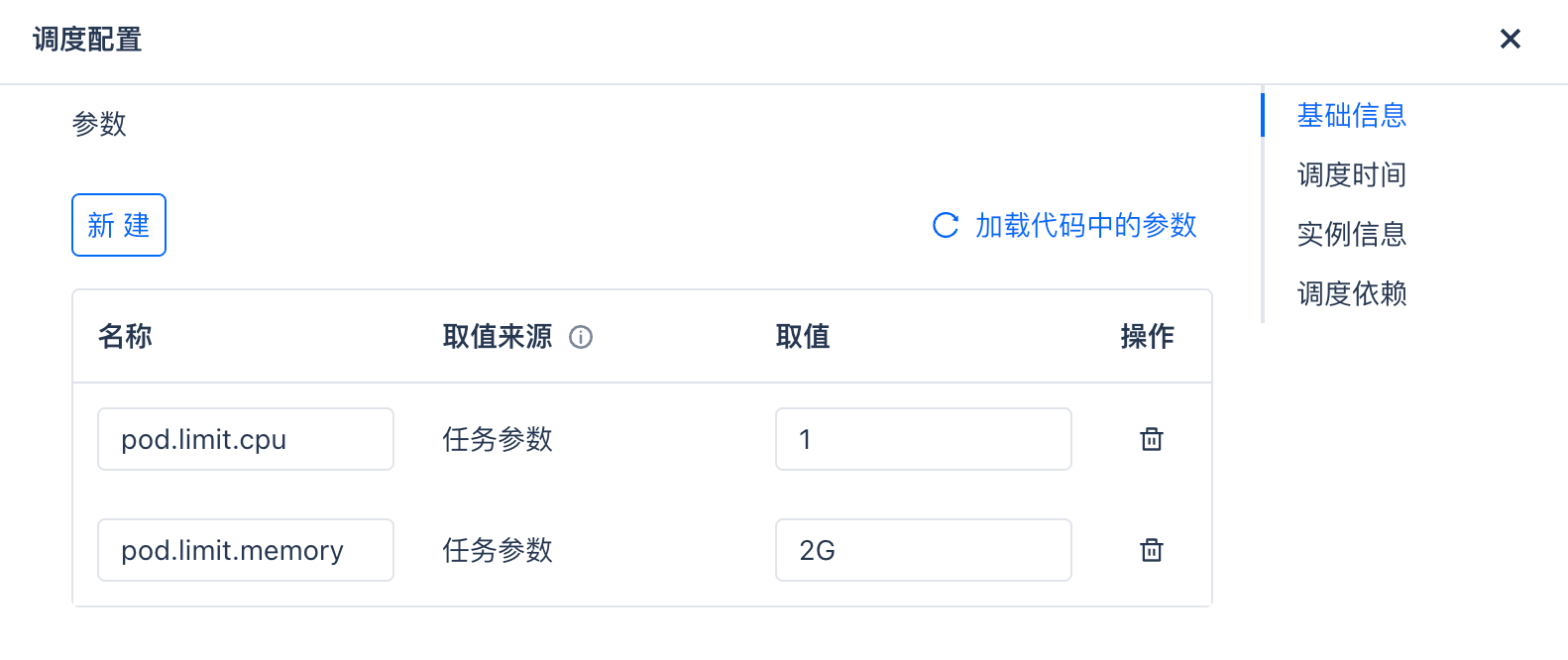
By configuring these parameters reasonably, you can ensure that Python tasks have sufficient resources to meet different computational needs while avoiding resource waste.
More Use Cases
Querying Lakehouse Data Using Python Database API
Establish connection:
Create cursor object:
Execute SQL query:
Fetch query results:
Using SQLAlchemy Interface to Query Lakehouse Data
Create an instance of the SQLAlchemy engine for Singdata Lakehouse:
Execute SQL query:
Execute the query using the engine: