
Complete Guide to Ingesting Data into Singdata Lakehouse
Data Ingestion: Bulkload and Realtime Data Loading via Java SDK
Overview
Singdata Lakehouse provides a JAVA SDK that allows you to load data into Singdata Lakehouse tables through Java and SQL programming in popular IDEs (such as VS Code).
Use Cases
This approach enables convenient batch data loading, making it suitable for large-scale batch data import and real-time writing within a Java programming environment. Singdata Lakehouse is optimized for large-volume data writes.
Implementation Steps
Download Code
Download the code for this guide from the GitHub repository to your local machine (skip this step if already downloaded).
Add the project directory to your VS Code workspace.
Modify Parameters
Rename the file config/config-ingest-sample.json to config/config-ingest.json, and modify the parameter values in config-ingest.json.
{ "username": "Please enter your username", "password": "Please enter your password", "service": "Please enter your service address, e.g. region_id.api.singdata.com", "instance": "Please enter your instance ID", "workspace": "Please enter your workspace, e.g. gharchive", "schema": "Please enter your schema, e.g. public", "vcluster": "Please enter your virtual cluster, e.g. default_ap", "sdk_job_timeout": 10, "hints": { "sdk.job.timeout": 3, "query_tag": "a_comprehensive_guide_to_ingesting_data_into_clickzetta" } }
Bulkload
Run BulkLoadFile.java in VS Code.
import com.clickzetta.client.BulkloadStream; import com.clickzetta.client.ClickZettaClient; import com.clickzetta.client.RowStream; import com.clickzetta.client.StreamState; import com.clickzetta.platform.client.api.Row; import org.json.JSONObject; import java.io.BufferedReader; import java.io.File; import java.io.FileReader; import java.sql.Connection; import java.sql.DriverManager; import java.sql.PreparedStatement; import java.sql.ResultSet; import java.sql.Statement; import java.text.MessageFormat; import java.nio.file.Files; import java.nio.file.Paths; import org.apache.log4j.PropertyConfigurator; public class BulkloadFile { private static ClickZettaClient client; private static String service; private static String instance; private static String password; private static String table = "lift\_tuckets\_import\_by\_java\_sdk\_bulkload"; private static String workspace; private static String schema; private static String vc; private static String user; static BulkloadStream bulkloadStream; public static void main(String\[] args) throws Exception { // Load log4j configuration file PropertyConfigurator.configure("config/log4j.properties"); // Read configuration file String content = new String(Files.readAllBytes(Paths.get("config/config-ingest.json"))); JSONObject config = new JSONObject(content); // Get values from JSON config file service = config.getString("service"); instance = config.getString("instance"); password = config.getString("password"); workspace = config.getString("workspace"); schema = config.getString("schema"); vc = config.getString("vcluster"); user = config.getString("username"); // Initialize initialize(); // Count lines in file int fileLineCount = countFileLines("data/lift\_tickets\_data.csv"); System.out.println("Total lines in file: " + fileLineCount); // Create table createTable(); // If target table exists, delete data from table deleteTableData(); // Insert data insertData(); // Check row count in table int tableRowCount = countTableRows(); System.out.println("Total rows in table: " + tableRowCount); // Compare line count in file with row count in table if (fileLineCount == tableRowCount) { System.out.println("Data inserted successfully! The row count matches."); } else { System.out.println("Data insertion failed! The row count does not match."); } // Close client client.close(); } private static void initialize() throws Exception { String url = MessageFormat.format("jdbc\:clickzetta://{1}.{0}/{2}?" + "schema={3}\&username={4}\&password={5}\&virtualcluster={6}&", service, instance, workspace, schema, user, password, vc); client = ClickZettaClient.newBuilder().url(url).build(); } private static int countFileLines(String filePath) throws Exception { try (BufferedReader reader = new BufferedReader(new FileReader(filePath))) { int lines = 0; while (reader.readLine() != null) lines++; return lines - 1; // Subtract header line } } private static void createTable() throws Exception { String url = MessageFormat.format("jdbc\:clickzetta://{1}.{0}/{2}?" + "schema={3}\&username={4}\&password={5}\&virtualcluster={6}&", service, instance, workspace, schema, user, password, vc); String createTableSQL = "CREATE TABLE if not exists " + table + " (" + "\`txid\` string," + "\`rfid\` string," + "\`resort\` string," + "\`purchase\_time\` string," + "\`expiration\_time\` string," + "\`days\` int," + "\`name\` string," + "\`address\_street\` string," + "\`address\_city\` string," + "\`address\_state\` string," + "\`address\_postalcode\` string," + "\`phone\` string," + "\`email\` string," + "\`emergency\_contact\_name\` string," + "\`emergency\_contact\_phone\` string);"; try (Connection conn = DriverManager.getConnection(url, user, password); PreparedStatement pstmt = conn.prepareStatement(createTableSQL)) { pstmt.executeUpdate(); System.out.println("Table created successfully."); } catch (Exception e) { // Ignore this error and continue System.out.println("Ignoring exception: " + e.getMessage()); } } private static void deleteTableData() throws Exception { String url = MessageFormat.format("jdbc\:clickzetta://{1}.{0}/{2}?" + "schema={3}\&username={4}\&password={5}\&virtualcluster={6}&", service, instance, workspace, schema, user, password, vc); try (Connection conn = DriverManager.getConnection(url, user, password); PreparedStatement pstmt = conn.prepareStatement("DELETE FROM " + schema + "." + table)) { pstmt.executeUpdate(); System.out.println("Data deleted successfully from table: " + table); } } private static void insertData() throws Exception { bulkloadStream = client.newBulkloadStreamBuilder().schema(schema).table(table) .operate(RowStream.BulkLoadOperate.APPEND) .build(); File csvFile = new File("data/lift\_tickets\_data.csv"); BufferedReader reader = new BufferedReader(new FileReader(csvFile)); // Skip the first line (header) reader.readLine(); // Skip the first line (header) // Insert data into database String line; while ((line = reader.readLine()) != null) { String\[] values = line.split(","); // Type conversion to match server-side types String id = values\[0]; // ID is a string type String contentValue = values\[1]; Row row = bulkloadStream.createRow(); // Set parameter values row\.setValue(0, id); row\.setValue(1, contentValue); // Must call this method, otherwise data cannot be sent to server bulkloadStream.apply(row); } // Close resources reader.close(); bulkloadStream.close(); waitForBulkloadCompletion(); } private static int countTableRows() throws Exception { String url = MessageFormat.format("jdbc\:clickzetta://{1}.{0}/{2}?" + "schema={3}\&username={4}\&password={5}\&virtualcluster={6}&", service, instance, workspace, schema, user, password, vc); try (Connection conn = DriverManager.getConnection(url, user, password); Statement stmt = conn.createStatement()) { String countSQL = "SELECT COUNT(\*) FROM " + schema + "." + table; try (ResultSet rs = stmt.executeQuery(countSQL)) { if (rs.next()) { return rs.getInt(1); } else { throw new Exception("Failed to count table rows."); } } } } private static void waitForBulkloadCompletion() throws InterruptedException { while (bulkloadStream.getState() == StreamState.RUNNING) { Thread.sleep(1000); } if (bulkloadStream.getState() == StreamState.FAILED) { throw new ArithmeticException(bulkloadStream.getErrorMessage()); } } }
View execution results.
Realtime Ingestion
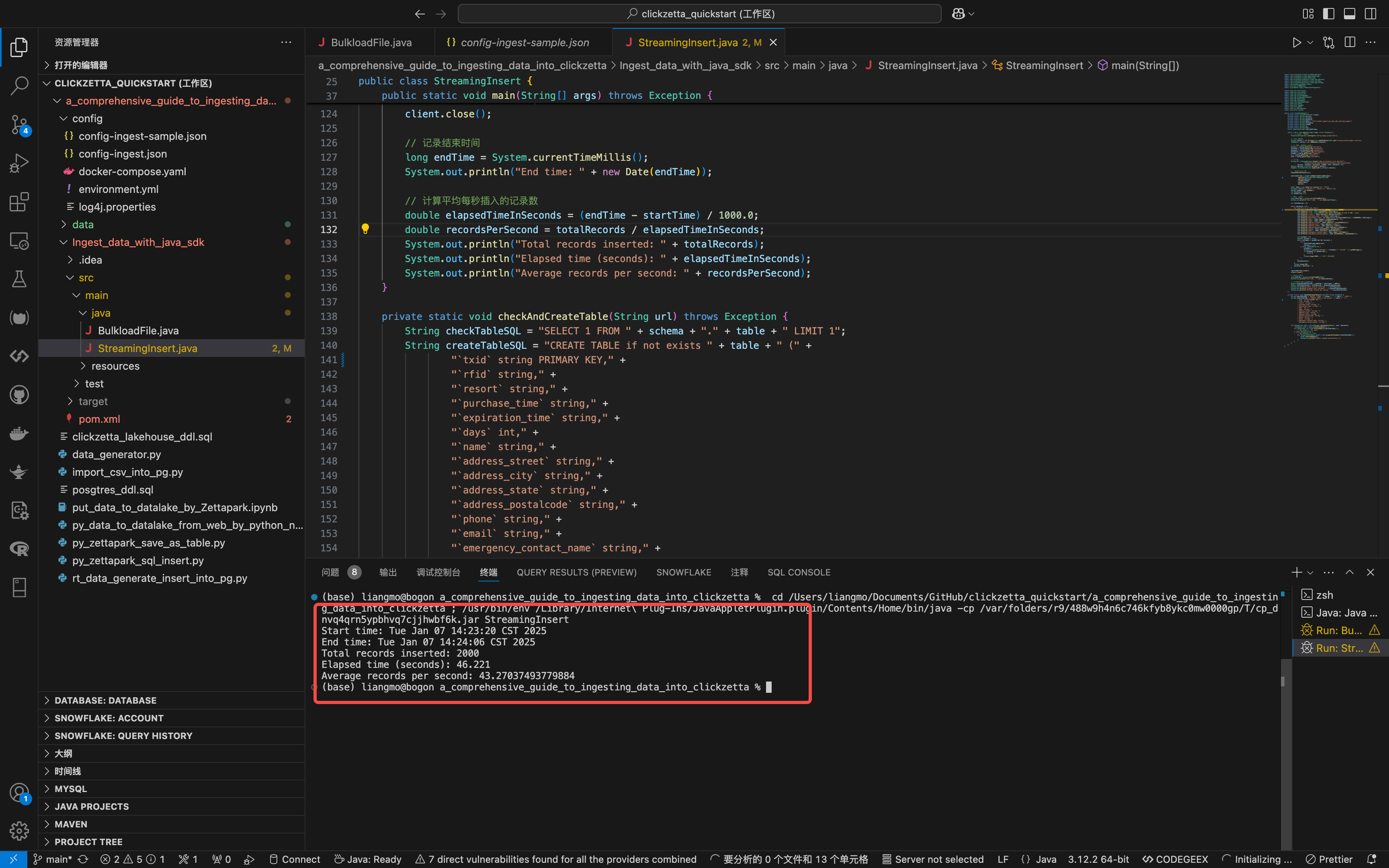
Run StreamingInsert.java in VS Code.
import com.clickzetta.client.ClickZettaClient; import com.clickzetta.client.RealtimeStream; import com.clickzetta.client.RowStream; import com.clickzetta.platform.client.api.Options; import com.clickzetta.platform.client.api.Row; import com.clickzetta.platform.client.api.Stream; import com.github.javafaker.Faker; import org.json.JSONObject; import org.apache.log4j.PropertyConfigurator; import java.nio.file.Files; import java.nio.file.Paths; import java.sql.Connection; import java.sql.DriverManager; import java.sql.PreparedStatement; import java.sql.ResultSet; import java.sql.Statement; import java.text.MessageFormat; import java.util.Date; import java.util.Random; import java.util.UUID; import java.io.IOException; import java.util.Locale; public class StreamingInsert { private static ClickZettaClient client; private static String service; private static String instance; private static String password; private static String table = "lift\_tuckets\_import\_by\_java\_sdk\_realtime\_ingest"; private static String workspace; private static String schema; private static String vc; private static String user; static RealtimeStream realtimeStream; public static void main(String\[] args) throws Exception { // Load log4j configuration file PropertyConfigurator.configure("config/log4j.properties"); // Read configuration file String content = new String(Files.readAllBytes(Paths.get("config/config-ingest.json"))); JSONObject config = new JSONObject(content); // Get values from JSON config file service = config.getString("service"); instance = config.getString("instance"); password = config.getString("password"); workspace = config.getString("workspace"); schema = config.getString("schema"); vc = config.getString("vcluster"); user = config.getString("username"); // Initialize String url = MessageFormat.format("jdbc\:clickzetta://{1}.{0}/{2}?" + "schema={3}\&username={4}\&password={5}\&virtualcluster={6}&", service, instance, workspace, schema, user, password, vc); Options options = Options.builder().build(); client = ClickZettaClient.newBuilder().url(url).build(); // Check and create target table checkAndCreateTable(url); realtimeStream = client.newRealtimeStreamBuilder() .operate(RowStream.RealTimeOperate.CDC) .options(options) .schema(schema) .table(table) .build(); Faker faker = new Faker(new Locale("zh", "CN")); String\[] resorts = {"Resort 1", "Resort 2", "Resort 3"}; Random random = new Random(); int duration = 200; int maxRetries = 3; // Record start time long startTime = System.currentTimeMillis(); System.out.println("Start time: " + new Date(startTime)); int totalRecords = 0; while (duration > 0) { for (int t = 1; t < 11; t++) { Row row = realtimeStream.createRow(Stream.Operator.UPSERT); row\.setValue("txid", UUID.randomUUID().toString()); row\.setValue("rfid", Long.toHexString(random.nextLong() & ((1L << 96) - 1))); row\.setValue("resort", faker.options().option(resorts)); row\.setValue("purchase\_time", new Date().toString()); row\.setValue("expiration\_time", new Date(System.currentTimeMillis() + 86400000L).toString()); row\.setValue("days", faker.number().numberBetween(1, 7)); row\.setValue("name", faker.name().fullName()); row\.setValue("address\_street", faker.address().streetAddress()); row\.setValue("address\_city", faker.address().city()); row\.setValue("address\_state", faker.address().state()); row\.setValue("address\_postalcode", faker.address().zipCode()); row\.setValue("phone", faker.phoneNumber().phoneNumber()); row\.setValue("email", faker.internet().emailAddress()); row\.setValue("emergency\_contact\_name", faker.name().fullName()); row\.setValue("emergency\_contact\_phone", faker.phoneNumber().phoneNumber()); int attempts = 0; boolean success = false; while (attempts < maxRetries && !success) { try { realtimeStream.apply(row); success = true; } catch (IOException e) { attempts++; System.err.println("Attempt " + attempts + " failed: " + e.getMessage()); if (attempts == maxRetries) { throw e; } Thread.sleep(1000); // Wait 1 second before retry } } totalRecords++; } Thread.sleep(200); duration = duration - 1; } realtimeStream.close(); client.close(); // Record end time long endTime = System.currentTimeMillis(); System.out.println("End time: " + new Date(endTime)); // Calculate average records inserted per second double elapsedTimeInSeconds = (endTime - startTime) / 1000.0; double recordsPerSecond = totalRecords / elapsedTimeInSeconds; System.out.println("Total records inserted: " + totalRecords); System.out.println("Elapsed time (seconds): " + elapsedTimeInSeconds); System.out.println("Average records per second: " + recordsPerSecond); } private static void checkAndCreateTable(String url) throws Exception { String checkTableSQL = "SELECT 1 FROM " + schema + "." + table + " LIMIT 1"; String createTableSQL = "CREATE TABLE if not exists " + table + " (" + "\`txid\` string PRIMARY KEY," + "\`rfid\` string," + "\`resort\` string," + "\`purchase\_time\` string," + "\`expiration\_time\` string," + "\`days\` int," + "\`name\` string," + "\`address\_street\` string," + "\`address\_city\` string," + "\`address\_state\` string," + "\`address\_postalcode\` string," + "\`phone\` string," + "\`email\` string," + "\`emergency\_contact\_name\` string," + "\`emergency\_contact\_phone\` string);"; try (Connection conn = DriverManager.getConnection(url, user, password); Statement stmt = conn.createStatement()) { try (ResultSet rs = stmt.executeQuery(checkTableSQL)) { // If table exists, do nothing } catch (Exception e) { // If table does not exist, create table try (PreparedStatement pstmt = conn.prepareStatement(createTableSQL)) { pstmt.executeUpdate(); System.out.println("Table created successfully."); } } } } }
View execution results:
Next Steps
View imported data through Studio Data Management. Clean and transform the imported data. Explore and analyze imported data through Data GPT.
Resources
Java SDK Overview